
3.1. Poisoning Attacks#
In this notebook, we will experiment with adversarial poisoning attacks. Poisoning attacks are performed at training time by injecting carefully-crafted samples that alter the classifier decision function so that its behavior at testing time is modified. In particular, we will analyze backdoor and label-flip attacks.
%%capture --no-stderr
try:
    import secmlt
except ImportError:
    %pip install secml-torch
3.1.1. Backdoor Poisoning Attacks#
In backdoor poisoning, the attacker acts on a subset of the training data by:
adding a specific pattern (i.e., the trigger);
modifying the label to a target class, satisfying the attacker’s goal.
In this way, the model learns a correlation between the trigger and the chosen label. As a consequence, at test time, the input samples containing the trigger will be misclassified as samples of the target class. On the other hand, the clean samples will be correctly classified.
We will implement a simple patch-based attack against a small neural network trained on MNIST. We first code the CNN used in the paper “BadNets: Identifying Vulnerabilities in the Machine Learning Model Supply Chain” (Gu et al., 2019).
import torch
#you can also try device = "cuda"
device = "cpu"

# Load a model
net = torch.hub.load("maurapintor/mnist_examples", "mnist_model")
net.to(device);
We then load the MNIST training dataset from the TorchVision datasets hub.
%%capture
import torchvision
from torch.utils.data import Subset

dataset_path = "data/datasets/"
N_TRAIN = 10000

training_dataset = torchvision.datasets.MNIST(
    transform=torchvision.transforms.ToTensor(),
    train=True,
    root=dataset_path,
    download=True,
)
training_dataset = Subset(training_dataset, range(N_TRAIN))
We now need a function to inject the backdoor. In particular, we will apply a white 4x4 patch in the bottom-right corner of the images.
def apply_patch(x: torch.Tensor) -> torch.Tensor:
    x[:, 0, 24:28, 24:28] = 1.0
    return x
We can now create our poisoned dataset loader.
The BackdookDatasetPytorch class of SecML-Torch is a custom PyTorch dataset that applies the backdoor through a custom function on a certain amount of the training data, also switching their labels to the desired target label. We set the portion of the manipulated training samples to 10%.
The backdoored dataset can thus be wrapped into a PyTorch DataLoader, and used for training the neural network.
from secmlt.adv.poisoning.backdoor import BackdoorDatasetPyTorch
from torch.utils.data import DataLoader


target_label = 1
backdoored_mnist = BackdoorDatasetPyTorch(
    training_dataset,
    data_manipulation_func=apply_patch,
    trigger_label=target_label,
    portion=0.2,
)
training_data_loader = DataLoader(backdoored_mnist, batch_size=64, shuffle=False)
Let’s visualize some of the training images!
import matplotlib.pyplot as plt
from torchvision.utils import make_grid


x_target = []
for x, y in training_data_loader:
    x_target.append(x[y == target_label])
x_target = torch.cat(x_target, dim=0)

grid = make_grid(x_target[:100], nrow=10, normalize=True, pad_value=1.0)
plt.figure(figsize=(10, 10))
plt.imshow(grid.permute(1, 2, 0).cpu())
plt.axis("off")
plt.show()
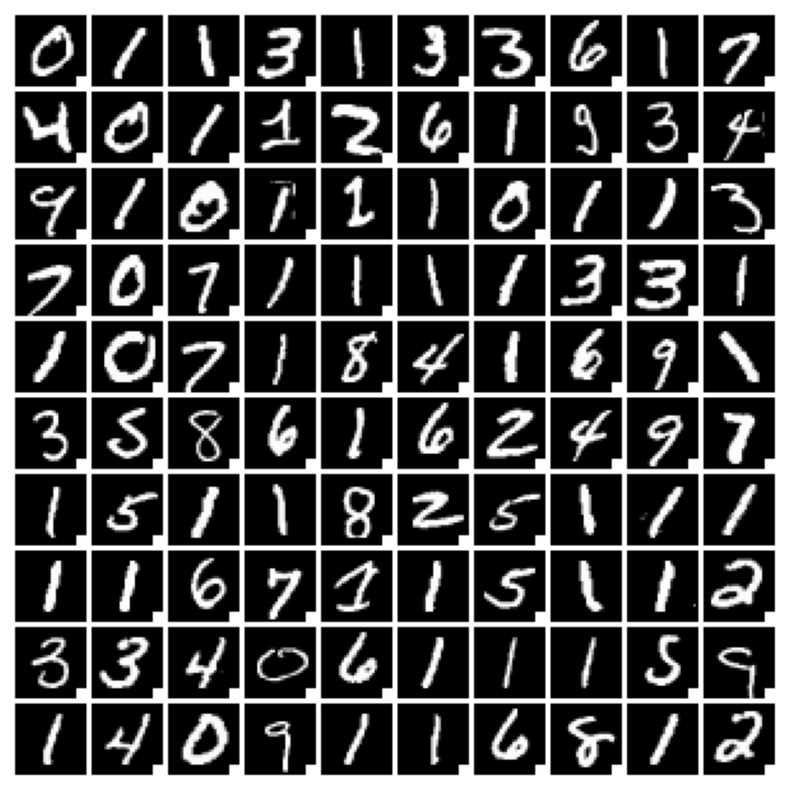
To train the model, we leverage the SecML-Torch utils, so that we have to instantiate:
a PyTorch optimizer, passing the network parameters;
a
BasePyTorchTrainer, passing the optimizer and the number of epochs;a
BasePytorchClassifier, wrapping the network and the trainer.
Finally, we only need to call the BasePytorchClassifier.train method, providing the training data loader.
from torch.optim import Adam
from secmlt.models.pytorch.base_pytorch_nn import BasePyTorchClassifier
from secmlt.models.pytorch.base_pytorch_trainer import BasePyTorchTrainer


optimizer = Adam(lr=1e-3, params=net.parameters())
trainer = BasePyTorchTrainer(optimizer, epochs=1)
model = BasePyTorchClassifier(net, trainer=trainer)
model.train(training_data_loader);
We can now load the MNIST test data and wrap it into a PyTorch DataLoader.
%%capture
N_TEST = 1000

test_dataset = torchvision.datasets.MNIST(
    transform=torchvision.transforms.ToTensor(),
    train=False,
    root=dataset_path,
    download=True,
)
test_dataset = Subset(test_dataset, range(N_TEST))
test_data_loader = DataLoader(test_dataset, batch_size=64, shuffle=False)
First, we test the accuracy on the clean test data.
from secmlt.metrics.classification import Accuracy


accuracy = Accuracy()(model, test_data_loader)
print("test accuracy: ", accuracy)
test accuracy: tensor(0.6330)
We then wrap the test dataset into the BackdoorDatasetPyTorch, applying the trigger to all the samples, and build a new PyTorch DataLoader to test the model on the backdoored dataset again.
from secmlt.metrics.classification import AttackSuccessRate


backdoored_test_set = BackdoorDatasetPyTorch(
    test_dataset, data_manipulation_func=apply_patch
)
backdoored_loader = DataLoader(backdoored_test_set, batch_size=64, shuffle=False)
We compute the attack success rate as the fraction of backdoored samples labeled with the target class.
asr = AttackSuccessRate(y_target=target_label)(model, backdoored_loader)
print(f"asr: {asr}")
asr: 0.4300000071525574
3.1.2. Label-flip Poisoning Attacks#
In label-flip poisoning, the attacker can only modify the labels of a training data subset to induce misclassification at test time. This can be done either randomly or based on heuristics.
We will implement the first solution, with the goal of making 0 digits classified as 1 and vice versa.
We first need a label manipulation function.
def flip_label(label):
    if label == 0:
        return 1
    elif label == 1:
        return 0
    return label
We can now create our poisoned dataset loader.
The PoisoningDatasetPyTorch class of SecML-Torch is a custom PyTorch dataset that can apply a custom manipulation function to either the inputs and/or their labels.
We want to manipulate the labels of the 50% of samples of both class 0 and 1.
The poisoned dataset can thus be wrapped into a PyTorch DataLoader, and used for training the neural network.
import random
from secmlt.adv.poisoning.base_data_poisoning import PoisoningDatasetPyTorch


targets = [training_dataset.dataset.targets[i] for i in training_dataset.indices]
class_0_idxs = [i for i, y in enumerate(targets) if y == 0]
class_1_idxs = [i for i, y in enumerate(targets) if y == 1]
poisoned_indexes = random.sample(class_0_idxs, len(class_0_idxs) // 2) + random.sample(
    class_1_idxs, len(class_1_idxs) // 2)

poisoned_mnist = PoisoningDatasetPyTorch(
    training_dataset,
    label_manipulation_func=flip_label,
    poisoned_indexes=poisoned_indexes,
)
poisoned_data_loader = DataLoader(poisoned_mnist, batch_size=64, shuffle=False)
As we want to separately inspect the model accuracy for each class, we write a function that creates a PyTorch DataLoader returning only the samples of a selected class.
from torch.utils.data import SubsetRandomSampler


def get_class_loader(label):
    test_targets = [test_dataset.dataset.targets[i] for i in test_dataset.indices]
    idxs = [i for i, y in enumerate(test_targets) if y == label]
    test_loader = DataLoader(test_dataset, batch_size=64, shuffle=False, sampler=SubsetRandomSampler(idxs))
    return test_loader
We will now train the model on both clean and poisoned data, and evaluate it on the test dataset.
We print the total accuracy, the class accuracies, and the attack success rate for classes 0 and 1, i.e., the ratio of class 0 samples misclassified as 1 and vice versa.
for k, data_loader in {
    "normal": training_data_loader,
    "poisoned": poisoned_data_loader,
}.items():
    net = torch.hub.load("maurapintor/mnist_examples", "mnist_model")
    net.to(device)
    optimizer = Adam(lr=1e-3, params=net.parameters())
    trainer = BasePyTorchTrainer(optimizer, epochs=1)
    model = BasePyTorchClassifier(net, trainer=trainer)
    model.train(data_loader)
    accuracy = Accuracy()(model, test_data_loader)
    print(f"test accuracy on {k} data: {accuracy.item():.3f}")
    for i in range(10):
        class_test_loader = get_class_loader(i)
        accuracy = Accuracy()(model, class_test_loader)
        print(f"    test accuracy (class {i} only): {accuracy.item():.3f}")
        if i == 0 or i == 1:
            asr = AttackSuccessRate(y_target=0 if i==1 else 1)(model, class_test_loader)
            print(f"        asr on class {i}: {asr}")
test accuracy on normal data: 0.724
    test accuracy (class 0 only): 0.871
        asr on class 0: 0.0941176488995552
    test accuracy (class 1 only): 1.000
        asr on class 1: 0.0
    test accuracy (class 2 only): 0.767
    test accuracy (class 3 only): 0.374
    test accuracy (class 4 only): 0.600
    test accuracy (class 5 only): 0.736
    test accuracy (class 6 only): 0.897
    test accuracy (class 7 only): 0.596
    test accuracy (class 8 only): 0.764
    test accuracy (class 9 only): 0.660
test accuracy on poisoned data: 0.816
    test accuracy (class 0 only): 0.035
        asr on class 0: 0.8941176533699036
    test accuracy (class 1 only): 0.873
        asr on class 1: 0.0793650820851326
    test accuracy (class 2 only): 0.879
    test accuracy (class 3 only): 0.860
    test accuracy (class 4 only): 0.727
    test accuracy (class 5 only): 0.954
    test accuracy (class 6 only): 0.885
    test accuracy (class 7 only): 0.939
    test accuracy (class 8 only): 0.876
    test accuracy (class 9 only): 0.957